How to Add Products to Shopee Quickly
When selling on Shopee, adding products to your shop is an important step in reaching buyers. However, new sellers often struggle with where to start, what information to enter and how to list products correctly while saving time. This article explains how to add products to Shopee efficiently with complete information, without spending too much time.
1. Access Shopee Seller Center
First, sign in to your Shopee seller account at: https://banhang.shopee.vn
After signing in, you will see the seller dashboard. This is where you manage products, orders, revenue and other sales-support features.
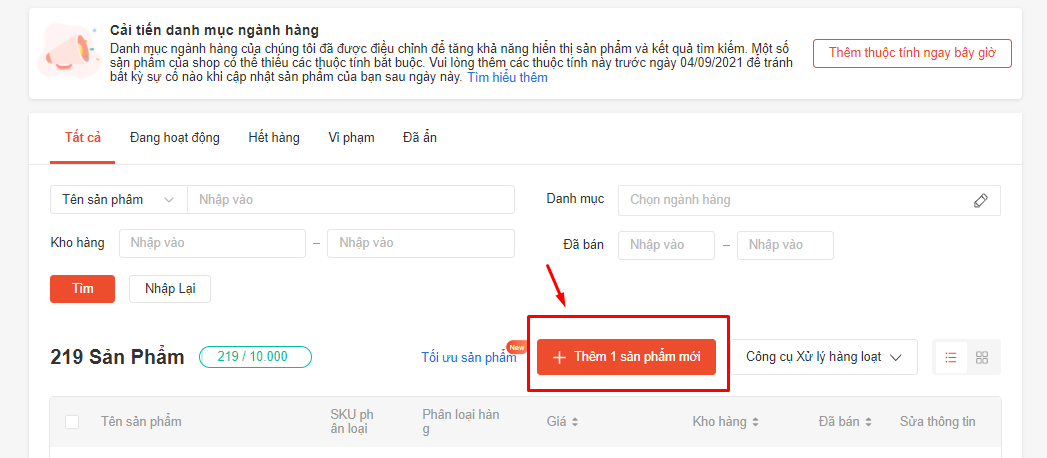
2. Select "Products" > "Add a New Product"
In the menu on the left, select "Products", then click "Add a New Product".
You will be taken to the product-listing interface, which includes fields such as product name, description, category, images, price and stock…
3. Enter detailed product information
This is the most important step. To present the product well and attract buyers, enter the following information completely and accurately:
Product name:
Clearly state what the product is, adding its color, material or main use if appropriate. Prioritize keywords that buyers commonly search for.
Example: Men's short-sleeved stretch cotton T-shirt
Category:
Choose the correct category so that the product is placed appropriately and can be recommended to the intended customers more easily.
Product description:
Write clearly and organize information into sections such as material, dimensions, colors, uses and instructions for use or care. Avoid making it overly lengthy or too brief.
Product images:
Upload at least 3 to 5 high-quality photos taken from different angles. Prioritize actual product photos with a clear, bright background.
Selling price:
Enter the actual selling price. If there is a promotional price, also enter a crossed-out price to show the discount.
Inventory and quantity:
Enter your current stock. Shopee automatically deducts inventory whenever an order is placed.
Product variations (if applicable):
If the product comes in different colors, sizes or versions, create variations so that customers can choose easily when ordering.
4. Set shipping information and weight
In the shipping-information section, enter the estimated package weight and dimensions. This information helps Shopee calculate shipping fees accurately.
Enter the correct weight to avoid unexpected delivery charges.
5. Review and click “Save & Display”
Sau khi hoàn tất mọi thông tin, bạn nhấn “Lưu & hiển thị”. Sản phẩm sẽ lập tức hiển thị trên gian hàng của bạn và khách hàng có thể nhìn thấy khi tìm kiếm.
Tips for listing products faster
-
Prepare an Excel spreadsheet or Word file containing product information, such as names, descriptions, prices, sizes and images, so that you can copy it quickly when listing.
-
If you sell many similar products, use the "Copy Product" feature to save time.
-
Use the “Bulk Creation” feature when you have many products and want to list them quickly with Shopee's Excel template.
-
Prepare a standard set of sample photos for each product type, so that you only need to change the name and price for a new listing.
Conclusion
Adding products to Shopee is not complicated when you understand the process and prepare the necessary information. Accurate, complete and professional listings from the outset help present products well, make a good impression and increase opportunities for quicker sales.
If you are a new seller, start with your first 3 to 5 products, prepare them carefully and then expand gradually.
Listing products correctly is an important first step toward effective selling on Shopee.